
Fallout 76
18 files
-
Fallout76 Start Pack 1.0
By Toby10
These are just simple start packs -
95% VATS.ba2"
FasterFirerate_2.0.ba2"
firerateandswing.ba2"
fireratelegendary.ba2"
InstantReloads.ba2"
No Item Processing.ba2"
NoSpinup.ba2"
NoStagger.ba2"
SkipScrapLegendaryPremium.ba2"\
UnlimitedGatlingMag.ba2"
82 downloads
(0 reviews)0 comments
Updated
-
Fallout76 Start Pack 2.0
By Toby10
The Archive Contains the Following:
NoClip.ba2"
ScorchedOfficer-nukemute.ba2"
TheTreesareGnomes(TreesOnly).ba2"
BushBeGone.ba2"
CompatibleWeightIndicator.ba2"
FastTerminals.ba2"
ImprovedHealthBars.ba2"
info.txt"
MoreLoot.ba2"
MuteNukeZone.ba2"
Noalarm.ba2"
63 downloads
(0 reviews)0 comments
Updated
-
Fallout76 Start Pack 3.0
By Toby10
The Archive Contains the Following:
InstantPowerArmor.ba2"
MagicBullet.ba2"
PiggyBank.ba2"
PurchaseProfit.ba2"
reject_any_quest.ba2"
RepairAnything.ba2"
RevengeWhileWanted.ba2"
DevContainers.ba2"
info.txt"
InstaBed.ba2"
InstaCore.ba2"
77 downloads
(0 reviews)0 comments
Updated
-
Fallout76 Start Pack 4.0
By Toby10
The Archive Contains the Following:
OPLegendaries.ba2"
Zoom.ba2"
FasterMelee.ba2"
HalfOffLegendaries.ba2"
info.txt"
OPGuns.ba2"
76 downloads
(0 reviews)0 comments
Updated
-
NO 1.0
By Toby10
The Archive Contains the Following:
NoCrematorExplosion.ba2"
NoExplosions.ba2"
NoSmokeM.ba2"
NoSmokeT.ba2"
info.txt"
NoArms.ba2"
34 downloads
(0 reviews)0 comments
Submitted
-
NO DOORS COLLECTION 1.0
By Toby10
The Archive Contains the Following:
NoDoors.ba2"
NoSiloElevatorHatch.ba2"
NSD.ba2"
security-door.ba2"
DrM.ba2"
EZWestek.ba2"
info.txt"
35 downloads
(0 reviews)0 comments
Submitted
-
GLOWING ITEMS 1.0
By Toby10
The Archive Contains the Following:
Glow.ba2"
GlowingKeys.ba2"
info.txt"
BagGlow.ba2"
24 downloads
(0 reviews)0 comments
Submitted
-
GLEAMING DEPTHS RAID COLLECTION 1.0
By Toby10
The Archive Contains the Following:
bigfuel.ba2"
bigfuel[small can].ba2"
Drill_Skip.ba2"
Guardian.ba2"
info.txt"
raid_big_fuelcans.ba2"
raid_big_generators.ba2"
yes i know there are duplicate NAMES - but the mod is different.
96 downloads
(0 reviews)0 comments
Submitted
-
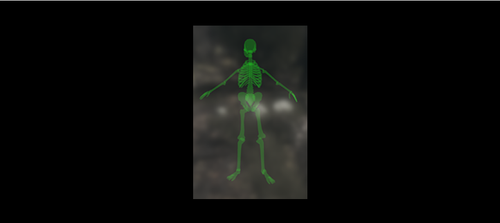
PlayerSkeletonESP - Green.ba2
By Toby10
This mod, projects a faint/translucent image of the skeleton over every players body.
this is also known as Extrasensory perception (ESP).
Human players will have this
Friendly allies will also have this.
Installation Instructions:
Once you download the file, use anyone of the file extractors,
Winzip, PowerArchiver or even WinRar
Extract the file, in this case, the mod file is called, PlayerSkeletonESP - Green.ba2
Locate the Data Folder: Find your Fallout 76 installation folder, specifically the Data folder (e.g., Steam\steamapps\common\Fallout76\Data). Move the BA2 File: Drag and drop the downloaded PlayerSkeletonESP - Green.ba2 mod file into this Data folder. Edit Fallout76Custom.ini: Navigate to Documents\My Games\Fallout 76. If Fallout76Custom.ini does not exist, create a new text file and name it Fallout76Custom.ini. Open the file and add the following lines (or append to existing lines): ini [Archive] sResourceArchive2List = ModName.ba2, PlayerSkeletonESP - Green.ba2 Note: Separate multiple mods with a comma. (modname.ba2,modname2.ba2,modname3.ba2m,) Launch the Game: Start Fallout 76; the mods should now be active.
Take note, some mods, like HUDplayerList or TextChat, need to be last on this list to run correctly.
10 downloads
(0 reviews)0 comments
Submitted
-
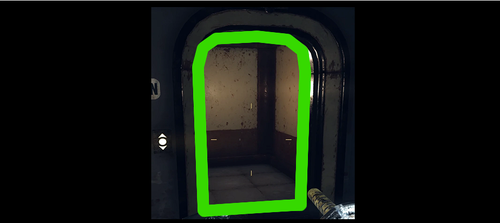
No More West-Tek Doors
By Toby10
THIS WILL REMOVE ALL WEST TEK DOORS!
WARNING ! - SOME MISSIONS REQUIRE YOU TO HAVE A DOOR TO WORK WITH
- just close the game, remove the mod, restart game do what you need to do, get to a saving point, then close, re-add mod and restart
- YOU WILL HAVE TO DO THIS WITH A MAJORITY OF ANY MOD THAT REMOVES DOORS - MISSIONS REQUIRE SOME DOORS ACCESSIBILITY.
Installation Instructions:
Once you download the file, use anyone of the file extractors,
Winzip, PowerArchiver or even WinRar
Extract the file, in this case, the mod file is called, DrM.ba2
Locate the Data Folder: Find your Fallout 76 installation folder, specifically the Data folder (e.g., Steam\steamapps\common\Fallout76\Data). Move the BA2 File: Drag and drop the downloaded DrM.ba2 mod file into this Data folder. Edit Fallout76Custom.ini: Navigate to Documents\My Games\Fallout 76. If Fallout76Custom.ini does not exist, create a new text file and name it Fallout76Custom.ini. Open the file and add the following lines (or append to existing lines): ini [Archive] sResourceArchive2List = ModName.ba2, DrM.ba2 Note: Separate multiple mods with a comma. (modname.ba2,modname2.ba2,modname3.ba2m,) Launch the Game: Start Fallout 76; the mods should now be active.
Take note, some mods, like HUDplayerList or TextChat, need to be last on this list to run correctly.9 downloads
(0 reviews)0 comments
Submitted
-
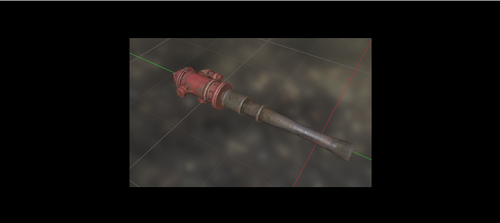
Firehydrant Bat
By Toby10
This mod replaces the standard Baseball Bat, with the firehydrant instead.
Now you have the bigger stick...
note: this is client side only.. meaning, only you can see this, or anyone else, having this exact file installed on Their end.
Installation Instructions:
Once you download the file, use anyone of the file extractors,
Winzip, PowerArchiver or even WinRar
Extract the file, in this case, the mod file is called, FireHydrantBat.ba2
Locate the Data Folder: Find your Fallout 76 installation folder, specifically the Data folder (e.g., Steam\steamapps\common\Fallout76\Data). Move the BA2 File: Drag and drop the downloaded FireHydrantBat.ba2 mod file into this Data folder. Edit Fallout76Custom.ini: Navigate to Documents\My Games\Fallout 76. If Fallout76Custom.ini does not exist, create a new text file and name it Fallout76Custom.ini. Open the file and add the following lines (or append to existing lines): ini [Archive] sResourceArchive2List = ModName.ba2, FireHydrantBat.ba2 Note: Separate multiple mods with a comma. (modname.ba2,modname2.ba2,modname3.ba2m,) Launch the Game: Start Fallout 76; the mods should now be active.
Take note, some mods, like HUDplayerList or TextChat, need to be last on this list to run correctly.5 downloads
(0 reviews)0 comments
Submitted
-
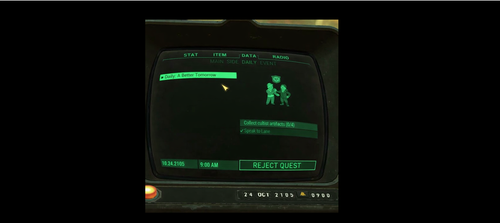
REJECT ANY QUEST
By Toby10
This adds the button, "Reject Quest"
This is good, if you broken the quest, or its not loading right..etc
id still ONLY use it as a LAST resort -
WARNING: USE AS LAST RESORT - OR YOU COULD BREAK YOUR PROGESS (Then youd have to have bethesda reset that mission for you)
Installation Instructions:
Once you download the file, use anyone of the file extractors,
Winzip, PowerArchiver or even WinRar
Extract the file, in this case, the mod file is called, reject_any_quest.ba2
Locate the Data Folder: Find your Fallout 76 installation folder, specifically the Data folder (e.g., Steam\steamapps\common\Fallout76\Data). Move the BA2 File: Drag and drop the downloaded bigfuel.ba2 mod file into this Data folder. Edit Fallout76Custom.ini: Navigate to Documents\My Games\Fallout 76. If Fallout76Custom.ini does not exist, create a new text file and name it Fallout76Custom.ini. Open the file and add the following lines (or append to existing lines): ini [Archive] sResourceArchive2List = ModName.ba2, reject_any_quest.ba2 Note: Separate multiple mods with a comma. (modname.ba2,modname2.ba2,modname3.ba2m,) Launch the Game: Start Fallout 76; the mods should now be active.
Take note, some mods, like HUDplayerList or TextChat, need to be last on this list to run correctly.15 downloads
(0 reviews)0 comments
Updated
-
SP SPOOF
By Toby10
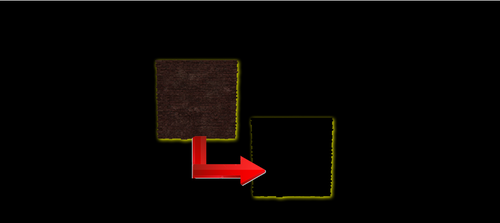
This just removes the textures collision.
so use this if you wish, or our Built-in No Clip
Author Notes; This mod removes wall and door collisions; look at the pictures to see which objects it is
Installation Instructions:
Once you download the file, use anyone of the file extractors,
Winzip, PowerArchiver or even WinRar
Extract the file, in this case, the mod file is called, SP-SPOOF.ba2
Locate the Data Folder: Find your Fallout 76 installation folder, specifically the Data folder (e.g., Steam\steamapps\common\Fallout76\Data). Move the BA2 File: Drag and drop the downloaded SP-SPOOF.ba2 mod file into this Data folder. Edit Fallout76Custom.ini: Navigate to Documents\My Games\Fallout 76. If Fallout76Custom.ini does not exist, create a new text file and name it Fallout76Custom.ini. Open the file and add the following lines (or append to existing lines): ini [Archive] sResourceArchive2List = ModName.ba2, SP-SPOOF.ba2 Note: Separate multiple mods with a comma. (modname.ba2,modname2.ba2,modname3.ba2m,) Launch the Game: Start Fallout 76; the mods should now be active.
Take note, some mods, like HUDplayerList or TextChat, need to be last on this list to run correctly.
7 downloads
(0 reviews)0 comments
Updated
-
BIG RAID FUEL CANISTERS
By Toby10
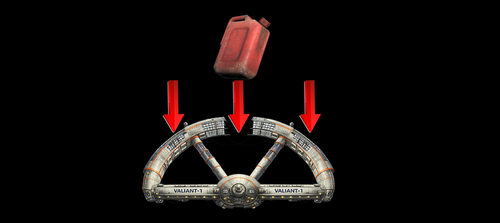
This mod, essentially, replaced the Mod/Texture with the Space station.
This method is common.
This makes gathering fuel canisters, easy and quicker, allowing the stage to be completed faster.
Installation Instructions:
Once you download the file, use anyone of the file extractors,
Winzip, PowerArchiver or even WinRar
Extract the file, in this case, the mod file is called, bigfuel.ba2
Locate the Data Folder: Find your Fallout 76 installation folder, specifically the Data folder (e.g., Steam\steamapps\common\Fallout76\Data). Move the BA2 File: Drag and drop the downloaded bigfuel.ba2 mod file into this Data folder. Edit Fallout76Custom.ini: Navigate to Documents\My Games\Fallout 76. If Fallout76Custom.ini does not exist, create a new text file and name it Fallout76Custom.ini. Open the file and add the following lines (or append to existing lines): ini [Archive] sResourceArchive2List = ModName.ba2, bigfuel.ba2 Note: Separate multiple mods with a comma. (modname.ba2,modname2.ba2,modname3.ba2m,) Launch the Game: Start Fallout 76; the mods should now be active.
Take note, some mods, like HUDplayerList or TextChat, need to be last on this list to run correctly.43 downloads
(1 review)0 comments
Updated
-
Drill Stage Skip
By Toby10
About This File
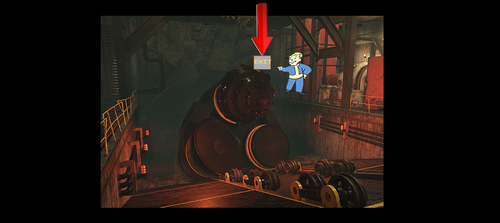
Texture piece was removed, allowing you to hop over the drill and skip the stage.
Installation Instructions:
Once you download the file, use anyone of the file extractors,
Winzip, PowerArchiver or even WinRar
Extract the file, in this case, the mod file is called, Drill_Skip.ba2
Locate the Data Folder: Find your Fallout 76 installation folder, specifically the Data folder (e.g., Steam\steamapps\common\Fallout76\Data). Move the BA2 File: Drag and drop the downloaded Drill_Skip.ba2 mod file into this Data folder. Edit Fallout76Custom.ini: Navigate to Documents\My Games\Fallout 76. If Fallout76Custom.ini does not exist, create a new text file and name it Fallout76Custom.ini. Open the file and add the following lines (or append to existing lines): ini [Archive] sResourceArchive2List = ModName.ba2, Drill_Skip.ba2 Note: Separate multiple mods with a comma. (modname.ba2,modname2.ba2,modname3.ba2m,) Launch the Game: Start Fallout 76; the mods should now be active.
Take note, some mods, like HUDplayerList or TextChat, need to be last on this list to run correctly.44 downloads
(0 reviews)0 comments
Submitted
-
RAID BIG GENERATORS
By Toby10
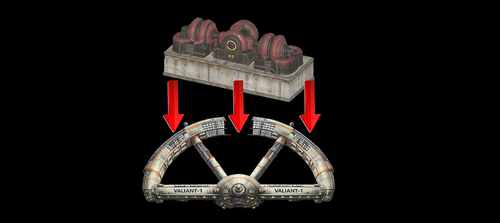
This mod, essentially, replaced the Mod/Texture with the Space station. This method is common, when you want to have a bigger target, easy to shoot and kill...there was a mod similar with ScorchBeast Queen, using the Space station instead, so it was easier to shoot down.
This makes Shooting the generators, easy and quicker, allowing the stage to be completed faster.
Installation Instructions:
Once you download the file, use anyone of the file extractors,
Winzip, PowerArchiver or even WinRar
Extract the file, in this case, the mod file is called, raid_big_generators.ba2
Locate the Data Folder: Find your Fallout 76 installation folder, specifically the Data folder (e.g., Steam\steamapps\common\Fallout76\Data). Move the BA2 File: Drag and drop the downloaded raid_big_generators.ba2 mod file into this Data folder. Edit Fallout76Custom.ini: Navigate to Documents\My Games\Fallout 76. If Fallout76Custom.ini does not exist, create a new text file and name it Fallout76Custom.ini. Open the file and add the following lines (or append to existing lines): ini [Archive] sResourceArchive2List = ModName.ba2, raid_big_generators.ba2 Note: Separate multiple mods with a comma. (modname.ba2,modname2.ba2,modname3.ba2m,) Launch the Game: Start Fallout 76; the mods should now be active.
Take note, some mods, like HUDplayerList or TextChat, need to be last on this list to run correctly.
Watch the Video of it
NexusMod Link: Does Not Exist
31 downloads
(0 reviews)0 comments
Updated
-

Revenge While Wanted & Raid Respawn
By Toby10
This Mod was originally to allow you to seek revenge while wanted, ability to shoot/kill even though youre not supposed to.
With this, youll see the option "Seek Revenge" press that and youll be seeking revenge.
2nd Part:
For Raids, youre limited to 1 Life.
When you die, press SEEK REVENGE, and youll be able to spawn back again.. ive done this and able to respawn back 4 times
44 downloads
(0 reviews)0 comments
Submitted
-
NoClip.ba2
By Toby10
This is NOCLIP.BA2
How to Use:
Holster your weapon (long press R) or what ever it is to hide your weapon
this is now active.
you can go back and forth at super fast speeds.
to disable, just pull out your weapon.
ill upload a video later if REALLY need it.
138 downloads
(2 reviews)0 comments
Submitted