

Toby10
-
Posts
63 -
Joined
-
Last visited
-
Days Won
9
Content Type
Forums
Store
Downloads
Events
Gallery
Everything posted by Toby10
-
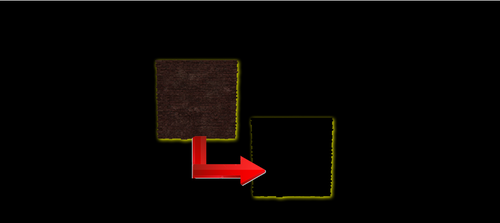
Version 1.0.0
7 downloads
This just removes the textures collision. so use this if you wish, or our Built-in No Clip Author Notes; This mod removes wall and door collisions; look at the pictures to see which objects it is Installation Instructions: Once you download the file, use anyone of the file extractors, Winzip, PowerArchiver or even WinRar Extract the file, in this case, the mod file is called, SP-SPOOF.ba2 Locate the Data Folder: Find your Fallout 76 installation folder, specifically the Data folder (e.g., Steam\steamapps\common\Fallout76\Data). Move the BA2 File: Drag and drop the downloaded SP-SPOOF.ba2 mod file into this Data folder. Edit Fallout76Custom.ini: Navigate to Documents\My Games\Fallout 76. If Fallout76Custom.ini does not exist, create a new text file and name it Fallout76Custom.ini. Open the file and add the following lines (or append to existing lines): ini [Archive] sResourceArchive2List = ModName.ba2, SP-SPOOF.ba2 Note: Separate multiple mods with a comma. (modname.ba2,modname2.ba2,modname3.ba2m,) Launch the Game: Start Fallout 76; the mods should now be active. Take note, some mods, like HUDplayerList or TextChat, need to be last on this list to run correctly. -
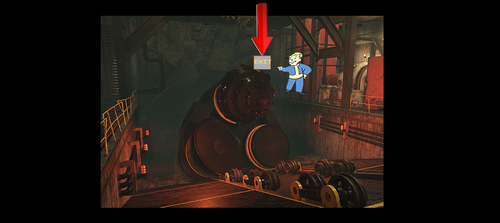
View File Drill Stage Skip About This File Texture piece was removed, allowing you to hop over the drill and skip the stage. Installation Instructions: Once you download the file, use anyone of the file extractors, Winzip, PowerArchiver or even WinRar Extract the file, in this case, the mod file is called, Drill_Skip.ba2 Locate the Data Folder: Find your Fallout 76 installation folder, specifically the Data folder (e.g., Steam\steamapps\common\Fallout76\Data). Move the BA2 File: Drag and drop the downloaded Drill_Skip.ba2 mod file into this Data folder. Edit Fallout76Custom.ini: Navigate to Documents\My Games\Fallout 76. If Fallout76Custom.ini does not exist, create a new text file and name it Fallout76Custom.ini. Open the file and add the following lines (or append to existing lines): ini [Archive] sResourceArchive2List = ModName.ba2, Drill_Skip.ba2 Note: Separate multiple mods with a comma. (modname.ba2,modname2.ba2,modname3.ba2m,) Launch the Game: Start Fallout 76; the mods should now be active. Take note, some mods, like HUDplayerList or TextChat, need to be last on this list to run correctly. Submitter Toby10 Submitted 02/23/2026 Category Fallout 76
-
Version 1.0.0
44 downloads
About This File Texture piece was removed, allowing you to hop over the drill and skip the stage. Installation Instructions: Once you download the file, use anyone of the file extractors, Winzip, PowerArchiver or even WinRar Extract the file, in this case, the mod file is called, Drill_Skip.ba2 Locate the Data Folder: Find your Fallout 76 installation folder, specifically the Data folder (e.g., Steam\steamapps\common\Fallout76\Data). Move the BA2 File: Drag and drop the downloaded Drill_Skip.ba2 mod file into this Data folder. Edit Fallout76Custom.ini: Navigate to Documents\My Games\Fallout 76. If Fallout76Custom.ini does not exist, create a new text file and name it Fallout76Custom.ini. Open the file and add the following lines (or append to existing lines): ini [Archive] sResourceArchive2List = ModName.ba2, Drill_Skip.ba2 Note: Separate multiple mods with a comma. (modname.ba2,modname2.ba2,modname3.ba2m,) Launch the Game: Start Fallout 76; the mods should now be active. Take note, some mods, like HUDplayerList or TextChat, need to be last on this list to run correctly. -
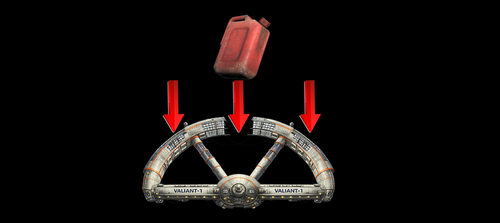
View File BIG RAID FUEL CANISTERS This mod, essentially, replaced the Mod/Texture with the Space station. This method is common. This makes gathering fuel canisters, easy and quicker, allowing the stage to be completed faster. Installation Instructions: Once you download the file, use anyone of the file extractors, Winzip, PowerArchiver or even WinRar Extract the file, in this case, the mod file is called, raid_big_generators.ba2 Locate the Data Folder: Find your Fallout 76 installation folder, specifically the Data folder (e.g., Steam\steamapps\common\Fallout76\Data). Move the BA2 File: Drag and drop the downloaded bigfuel.ba2 mod file into this Data folder. Edit Fallout76Custom.ini: Navigate to Documents\My Games\Fallout 76. If Fallout76Custom.ini does not exist, create a new text file and name it Fallout76Custom.ini. Open the file and add the following lines (or append to existing lines): ini [Archive] sResourceArchive2List = ModName.ba2, bigfuel.ba2 Note: Separate multiple mods with a comma. (modname.ba2,modname2.ba2,modname3.ba2m,) Launch the Game: Start Fallout 76; the mods should now be active. Take note, some mods, like HUDplayerList or TextChat, need to be last on this list to run correctly. Submitter Toby10 Submitted 02/23/2026 Category Fallout 76
-
Version 1.0.0
43 downloads
This mod, essentially, replaced the Mod/Texture with the Space station. This method is common. This makes gathering fuel canisters, easy and quicker, allowing the stage to be completed faster. Installation Instructions: Once you download the file, use anyone of the file extractors, Winzip, PowerArchiver or even WinRar Extract the file, in this case, the mod file is called, bigfuel.ba2 Locate the Data Folder: Find your Fallout 76 installation folder, specifically the Data folder (e.g., Steam\steamapps\common\Fallout76\Data). Move the BA2 File: Drag and drop the downloaded bigfuel.ba2 mod file into this Data folder. Edit Fallout76Custom.ini: Navigate to Documents\My Games\Fallout 76. If Fallout76Custom.ini does not exist, create a new text file and name it Fallout76Custom.ini. Open the file and add the following lines (or append to existing lines): ini [Archive] sResourceArchive2List = ModName.ba2, bigfuel.ba2 Note: Separate multiple mods with a comma. (modname.ba2,modname2.ba2,modname3.ba2m,) Launch the Game: Start Fallout 76; the mods should now be active. Take note, some mods, like HUDplayerList or TextChat, need to be last on this list to run correctly. -
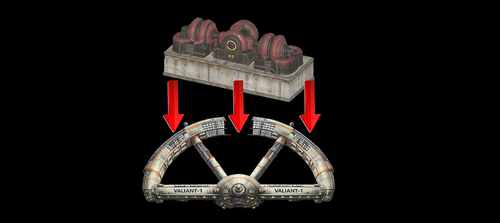
View File RAID BIG GENERATORS This mod, essentially, replaced the Mod/Texture with the Space station. This method is common, when you want to have a bigger target, easy to shoot and kill...there was a mod similar with ScorchBeast Queen, using the Space station instead, so it was easier to shoot down. This makes Shooting the generators, easy and quicker, allowing the stage to be completed faster. Watch the Video of it NexusMod Link: Does Not Exist Submitter Toby10 Submitted 02/23/2026 Category Fallout 76
-
Version 1.0.0
31 downloads
This mod, essentially, replaced the Mod/Texture with the Space station. This method is common, when you want to have a bigger target, easy to shoot and kill...there was a mod similar with ScorchBeast Queen, using the Space station instead, so it was easier to shoot down. This makes Shooting the generators, easy and quicker, allowing the stage to be completed faster. Installation Instructions: Once you download the file, use anyone of the file extractors, Winzip, PowerArchiver or even WinRar Extract the file, in this case, the mod file is called, raid_big_generators.ba2 Locate the Data Folder: Find your Fallout 76 installation folder, specifically the Data folder (e.g., Steam\steamapps\common\Fallout76\Data). Move the BA2 File: Drag and drop the downloaded raid_big_generators.ba2 mod file into this Data folder. Edit Fallout76Custom.ini: Navigate to Documents\My Games\Fallout 76. If Fallout76Custom.ini does not exist, create a new text file and name it Fallout76Custom.ini. Open the file and add the following lines (or append to existing lines): ini [Archive] sResourceArchive2List = ModName.ba2, raid_big_generators.ba2 Note: Separate multiple mods with a comma. (modname.ba2,modname2.ba2,modname3.ba2m,) Launch the Game: Start Fallout 76; the mods should now be active. Take note, some mods, like HUDplayerList or TextChat, need to be last on this list to run correctly. Watch the Video of it NexusMod Link: Does Not Exist -
DISCORD SERVER IS RESTORED.
-
toby10incher
-
The Discord Server is inactive at this time, Please refer to the Backup server. If you have questions please just be patient. you can dm me on discord for the BACKUP DISCORD Server.
-
there was a recent update.. it might be fixed now.
-
its 2 things, SPEED MODIFIER DAMAGE MODIFIER from the game, its just one weeapon PEPPER SHAKER - 2 shot -poloshied -durabillty SINGLE BARREL PLASMA/LASER magazine
-
2025 These are currently the payment options supported. If more options are added they will be announced. Want to use Zelle? Open a Support Ticket and Request payment via Zelle

-

Version 1.0.0
44 downloads
This Mod was originally to allow you to seek revenge while wanted, ability to shoot/kill even though youre not supposed to. With this, youll see the option "Seek Revenge" press that and youll be seeking revenge. 2nd Part: For Raids, youre limited to 1 Life. When you die, press SEEK REVENGE, and youll be able to spawn back again.. ive done this and able to respawn back 4 times -
Version 1.0.0
138 downloads
This is NOCLIP.BA2 How to Use: Holster your weapon (long press R) or what ever it is to hide your weapon this is now active. you can go back and forth at super fast speeds. to disable, just pull out your weapon. ill upload a video later if REALLY need it. -
View File NoClip.ba2 This is NOCLIP.BA2 How to Use: Holster your weapon (long press R) or what ever it is to hide your weapon this is now active. you can go back and forth at super fast speeds. to disable, just pull out your weapon. ill upload a video later if REALLY need it. Submitter Toby10 Submitted 02/04/2025 Category Fallout 76
-

How to ReLink New Key after Registering on forum
Toby10 replied to Toby10's question in Inquiries & Support
im sure its been solved but for other users looking at this, this issue is because you didnt register the kia via the sevensixty user panel then you verify via the bot commands ive since uploaded a video showing this. Above. -
How to ReLink New Key after Registering on forum
Toby10 replied to Toby10's question in Inquiries & Support
So after all that, to RE-LINK your account, in discord, goto the Bot-commands channel, type in /verify then yourkey and press enter. MAKE SURE NOT SPACES! -
To Register on the website 1) register at https://ninfoxtechnologies.com/ 2) Add your https://ninfoxtechnologies.com/clients/addresses/ *This step is mandatory to generate your new license key* 3) Open a support ticket https://ninfoxtechnologies.com/forum/48-purchase-support/ 4) use your new key on the Seven-Six User Panel 5) After you get your new license key and register via User Panel, goto discord here, goto #bot-commands and type in /verify LICENSEKEY then __typeinyourlicensekey__ then press enter and youll be registered. if you get an INVALID reply back in discord, that means you didnt register it within the User Panel You can find your new license key in your Manage Purchases https://ninfoxtechnologies.com/clients/purchases/ *When you open a support ticket, include your Old License Key, and how many days remaining* **YOU HAVE UNTIL JAN'20TH TO DO THIS OR YOUR CURRENT OLD LICENSE KEY WILL NOT WORK.** Watch How its done.